As mentioned previously there are up to four structural levels you can set up for a given project.
Site > Zone > Camera > Scene.
You can configure multiple zones per site, and have multiple cameras per zone. In the case of PTZ cameras, it is also possible to set up multiple scenes, using a single camera to cover a wider area. However, in general the simplest and recommended approach is to use one zone per camera unless there is a reason this is not practical for your specific situation.
Be aware that statistics shown on the dashboard are at the zone level. Therefore, if the overall desire is for Risk alerts, Alarms and statistics to correspond to a camera view, the best approach is to configure a zone that covers the entire area you are interested in, with one camera per zone.
If multiple cameras are configured in a single zone, statistics will be aggregated. This may be what you want, but you will have to be careful to avoid situations where the views overlap and double counting occurs. This can be done with masking. In some situations, using multiple cameras may not result in the most meaningful results, for example where crowds move from one camera view to the other, routinely swap between them or there is a large disparity between the area size seen by each camera. Consider expected crowd movement when planning your zones to ensure the statistics are as meaningful as possible. DCM can advise the optimal structure after reviewing your specific situation.
Scenes work differently. The camera must capture images in each scene in sequence. Moving and zooming the camera to do this takes several seconds. When multiple scenes are present, the default view groups them in a grid. In general the most recently sampled scene will provide the current statistics. This scene will be highlighted with a yellow label. No averaging or aggregation is done, so depending on the area under observation for each scene you may get uneven results. The more scenes are configured, the lower the sampling frequency. For these reasons, it is recommended to only use multiple scenes on a single PTZ camera if there is no alternative.
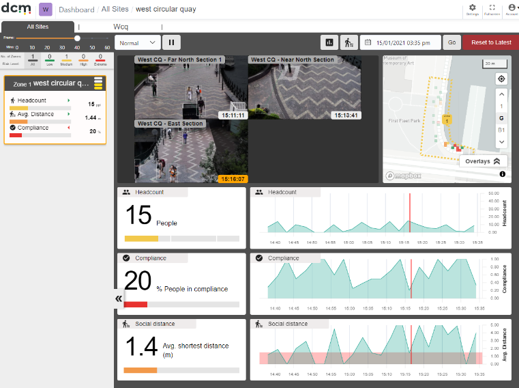
An example of a multi scene view. Statistics are from the scene highlighted in yellow.
You can enlarge a scene to view in more detail by clicking on it.