

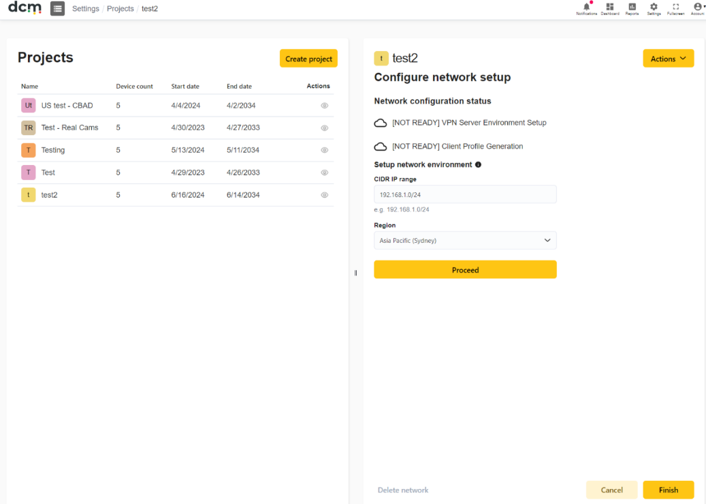
After creating a project, the next step is to connect the device network with DCM. Each project can only setup one network. With your project selected, use the ‘Network’ tab in the projects screen to set up the VPN connection. From the ‘Actions’ dropdown choose ‘Configure Network’.
Follow the steps below for network setup:
· Enter the IP range of your CCTV network and press ‘Proceed’. This will create dedicated VPN resources on the DCM network for the new project. You will need to input the range of IPs that your cameras are using in CIDR notation. For example, 192.168.100.0/24 represents the IPv4 addresses from 192.168.100.0 to 192.168.100.255. We recommend specifying ranges no larger than /24 to avoid failures in some situations.
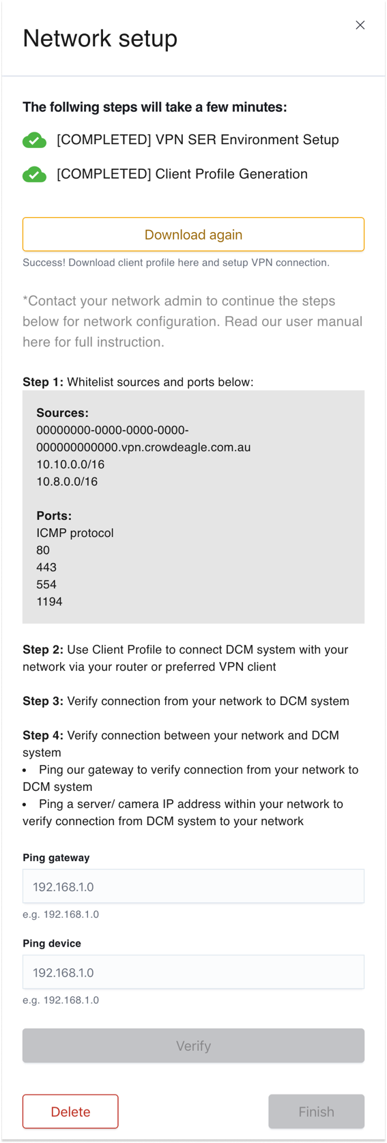
· Wait a few minutes for the VPN setup and for DCM to generate a Client Profile. The icon will become a green tick whenever the step is succeeded. If the icon turns to red, please try again or read the troubleshooting guide at the end of this section.
🌐 Network Configuration Steps
-
Download the client profile.
-
Your network admin will need to use the client profile and whitelist sources and ports displayed on screen to setup the network configuration via your router or VPN.
-
Verify connection from your Network to the newly provisioned VPN server. Use the IP address shown to perform a ping test from a machine connected to the same subnet as your cameras.
-
Use the buttons provided on this menu to verify connection from DCM to your Network. Enter the IP of your gateway and then your camera to generate a ping from the DCM server end.
-
Press ‘Verify’ to complete verifications from both ends of the link.
-
If the verification succeeds, your network configuration is completed. Press Finish to save and exit. If the verifications failed, please review each step and try again with your network admin.
⚠ Troubleshooting Network Connection
-
If you are unable to ping the DCM server please ensure that you have the correct IP, and your firewall allows for ICMP functionality.
-
If you are unable to ping your gateway or devices from the dashboard, please ensure that your network is allowing traffic through the different network zones.
For any issues with the network connection setup, please refer to the troubleshooting section