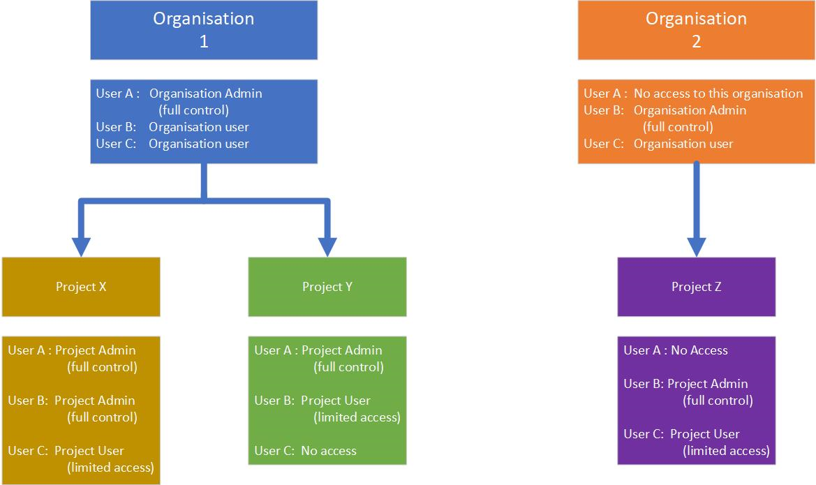
Roles are used to provide the Organisation Administrator with a hierarchy structure to the permissions and access for their users. They give a high level of flexibility for varying levels of access.
Organisation Level:
Organisation Administrator: or Organisation Admin
has the power to view and edit all aspects of the platform. An organisation may have multiple projects with separate DCM installations. They can set up projects, and sites and use the billing and payment portal.
Organisation User:
General users, invited to view the organisation’s DCM platform. They may have access to one or more projects within that organisation. They may be configured as an administrator for one project, but only a viewer for another.
Project Level:
Site/Project Admin:
Each project will have one or more Administrators who have full control over that project and only that project. The Project Admin is able to add and remove users, change their permissions and access. They can only be removed or changed by an Organisation Administrator. Each project must have a site owner allocated, by default this is the person who created the Project.
Site/Project User:
A user is a person that is staff on the ground operationally, they are the team leaders and supervisors. They have access to the dashboard, can customise their dashboard and review content but are unable to access the user management or site set up menus.
An Example DCM user rights setup