Current User Profile
Aside from the Administrator functions described earlier – all users, including non admins, have the ability to alter a few settings on their personal account via the “Account > Profile” option at the top right of the menu.
Users can change their own Name and phone contact details. Since their email address is used for authentication, and changes to that must be done via an administrator.
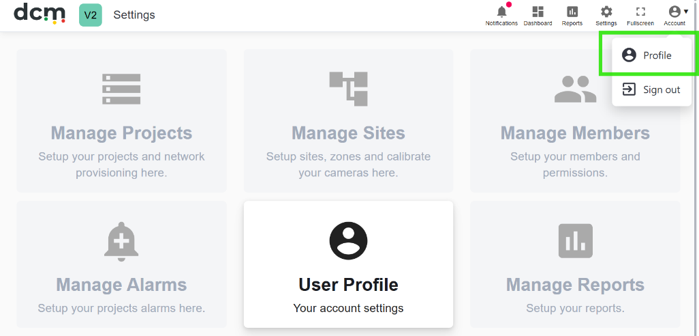
The user can choose to hide alarm popups for their account only (across Projects).
If you have access to more than one DCM project – the user can set a default Project to load on initial login here. You can also set the interface to automatically switch focus to the highest density camera within your current project automatically after a set time. This feature is useful for a user account used for Control Room display for example – to show the most ‘active’ camera. Remember to save any changes.
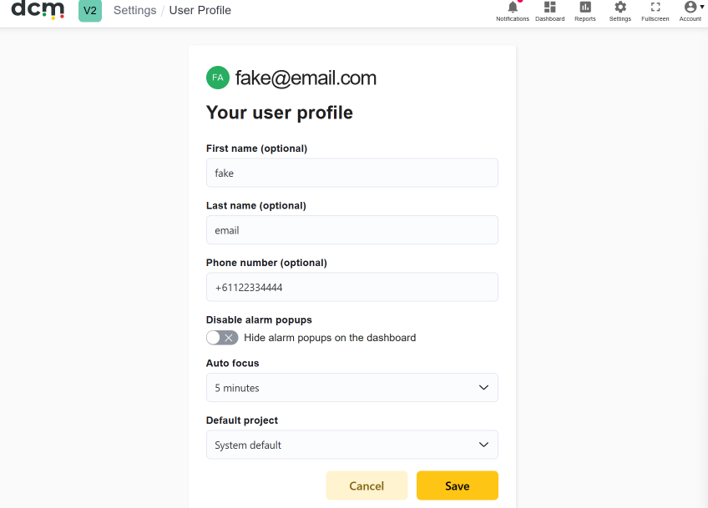
There is also an option here to automatically focus the dashboard on the zone with the highest density.
This feature polls every few minutes (configurable as above in the Auto Focus setting), and moves the displayed zone to the one with the highest density at poll time.
This can be useful for displaying the most active zone automatically in Control room screens that may not be easily controlled manually.